My homemade bacon from a 9.5 pound slab of pork belly is complete.
Finished smoking it at about 165 degrees on my Traeger with cherry pellets. I complimented with some apple chips in a smoke tube mixed with the cherry pellets.
Put in the fridge overnight and cut about half the slab into strips Monday. Placed everything in plastic ziplock bags.
Tonight I finished the process slicing the rest of the slab into strips and vacuum sealing into packages.
With what I already cooked and sliced tonight I ended up with about 64 thick slices of delicious bacon!
Some pics below of what 9.5 pounds of pork belly turned into bacon!
Vacuum sealed bacon! The finale!Getting started vacuum sealing.First part of the slicing.Getting a breakfast sandwich ready with just sliced bacon.Bacon cut in half cooking.Squeezing bacon into a skillet.Breakfast sandwich.First slices have been madeThe slab is ready!Start of the smoking process.Just rinsed the brine off and inserted temperature gauges.Done with a 10 day brine.
September 25, 2024
by dhoytt Comments Off on Audio Receiver Updates While Listening to Music Stream
I was finally able to migrate my web server to another system and OS (Operating System) to better keep up with updates. I was on Fedora 34 Linux, and I moved the web server over to Rocky Linux 9.x. Fedora only goes 3 versions back for updates and their current version just moved to Fedora 40. Fedora is a bleeding edge Linux OS with a lot of the latest SW which can add further incompatibilities if developers have not had time to update their programs or utilities to use those libraries\software. Fedora actually does a nice job of updating through the versions but that often leads to incompatible versions of PhP or other SW with applications such as WordPress plugins, the MySQL DB etc.
Since I have my own XCP.ng virtual environment I cloned my webserver and worked on that offline after changing the Ip. Address on the system and in the MySQL database.
First, I did the clone then updated to current versions of Fedora this led to a list of issues.
Apache redirects in http.conf and .htacecss were highly customized and did not work
Had to sync with MySQL dB Ip. Address entries as well
The PHP version mismatches were all over the place
Had to disable or remove many plugins
This normally reliable method left me with an unusable website.
I tried this a few times since it had worked for me in the past.
Next, I created a new VM/system with the same system specs using Rocky Linux 9.
Started with a brand-new version of WordPress
Setup WordPress networking multi-site
Created each site the way I wanted with no data
Installed WordPress plugins fresh if the plugins were maintained and updated.
Found new WordPress plugins or did not install outdate non-maintained plugins.
Installed the WordPress themes I wanted to use and checked they were updated and maintained.
Did a copy of the website files using rsync.
Used Heidi SQL to copy the MySQL DB’s over to this new system
Changed Ip. Addresses in DBs, Apache web server and web configuration files.
This site started working I then decided to increase my website mountpoints size.
Noticed it was under “/” which is root of course and it is not contiguous due to swap.
I have extended “/” several times over the years but this time it just crashed the VM by not booting.
I ended up restoring the VM (Virtual Machines) from a backup I do using the XCP-ng XOA (Xen Orchestra Appliance) source from GitHub.
I did not want to have a large “/” so I decided to split off the mountpoint to a new drive and copy data over which was just as problematic because I had some other system files in the mountpoint.
Since I decided I wanted more space on the website mountpoint I created a whole new VM with the drives sizes I wanted using Rocky Linux 9.x. Now I would be able to cleanly extend drives and mountpoint space if needed
Initial install for some odd reason the system did not boot
Figured it was how I ordered the mountpoints with the boot partition, swap but may have been how I formatted it. I was resizing and moving mountpoints around prior to the OS install probably chose the wrong formatting option without noticing.
Once I got the system to bootup properly on Rocky Linux 9 I installed updates, and the software packages needed to run a web server.
Started with a brand-new version of WordPress
Setup WordPress networking multi-site
Created each site the way I wanted with no data
Installed WordPress plugins fresh if they were maintained and updated.
Found new WordPress plugins or did not install outdate non-maintained plugins.
Installed the WordPress themes I wanted to use and checked they were updated and maintained.
Imported the posts, comments and other data using WP-Import data from the original site to each multi-site.
Created new menus’ and exported them to the other sites using WPS Menu Exporter plugin.
Used Heidi SQL to copy the MySQL DB’s over to this new system
Did a copy of the website files using rsync.
Used Heidi SQL to copy the MySQL DB’s over to this new system
Changed Ip. Address in DBs, Apache web server and web configuration files
Moved over ssl certificates to the new web server
Fine-tuned settings for performance and SEO.
I still have a few things to accomplish but it’s comforting to get on Rocky Linux 9.x which is a long-term OS that will be around with updates for years instead of the bi-annual update cycle of Fedora that is only has. Just an FYI all places I have MySQL it’s the fork MariaDB.
August 31, 2024
by dhoytt Comments Off on Starting LAbor Day Music Varied Genre Style
Throwing that Snakeice House of Beats mix out today. Can’ just do one genre or time period a there’s just too much music to listen to I want to listen to with you.
Listening to artist like The Sugarhill Gang, Paris, Vory, Jack Harlow, Nicki Minaj, Steve Miller Band, DVSN and Stacey Q.
August 24, 2024
by dhoytt Comments Off on Some Saturday Late Night fun and then Slow
I updated the overall dhoytt.com ssl certificates as well as the ssl certificate associated with streams embedded in the site. If your are using a player that is secure just point to the streams and most will prompt you to update the cert or just update it.
Here’s a list of my streams and bitrates you can place in you media players or click on and it may play if you have a compatible media player or browser:
You can also look on my Now Playing Pagehttps://dhoytt.com/snake-ice-radio-blog/now-playing/ for the following media players to listen. There may be a slight delay before they start playing of several seconds especially for the IceCast relay media players embedded on the site.
The vegetable garden is in motion this 2024 year! I had to scalp the top soil about 4 inches deep to get the clumps of weeds out of the garden. Had about 300 lbs of debris in the yard waste can 2 weeks in a row.
Then ended up getting some compost and new top soil to mix in then mixed in with the rototiller. The dry top soil let my feet sink in about 8 inches right after tilling the soil .
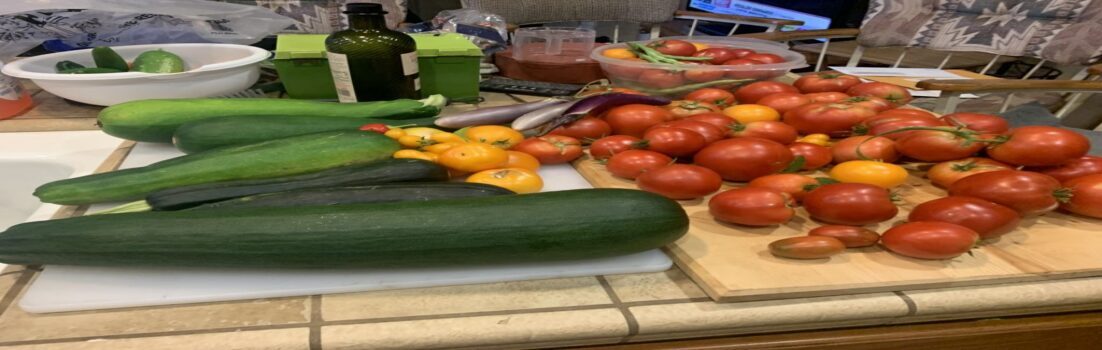
I planted big beef, early girl, cherry, and yellow pear tomatoes. Planted zucchini and crook necked squash, Japanese long cucumbers , eggplants, cabbage and Swiss chard. Added peppers like jalapeño, habanero, Fresno and poblano . Other plants, garden beans, romaine lettuce, herbs like purple basil, sweet basil, cilantro, French tarragon, and fennel.
Did dense seed plantings of collard greens, garden beans, peas, sugar pod snow peas, arugula, romaine lettuce, okra, green bunch onions, scarlet antes carrots, and beets.
I’ll add a few other veggies as I go and I always have my raspberry and grape vines as well.
This year the dense planting without rows will be different. I have gone without rows before but never purposely planted seeds densely. Going to be very interesting.
I intend to go almost purely with low lying bubblers on my drip system I already have in place for the vegetable garden and the flower garden. I actually the flower garden ready before the vegetable gardens. The vegetable garden gets the attention because it’s more work.
Garden is wild on the west of yard.Wild garden on East of the yard.Yard waste full to the top with top soil intertwined with weeds.How I had to “scalp” the top soil down 3 to 4 inches to get the root of the weeds.West garden after pulling weeds and tilling.East garden after tilling and trimming rosemary bush.West garden ready!East garden ready.