I have been having sporadic Internet connectivity issues lately and today noticed this happened several times Finally about 30 minutes ago I get texted from monitoring I have on my site notifying me my site is down, I discover I cannot contact my router and it’s literally powered off. I look over the router and the power switch is no longer depressed and will not stay depressed to keep the power on!
I had to use duct tape since electrical tape wasn’t quite adhesive enough and some folded paper to keep the power switch depressed with electrical tape keeping the edges down and smooth.
Then went on Internet and found this is a consistent issue with all ASUS routers. I have already had my share of issues from the “kernel: VFS: file-max Limit 22684 reached” error which causes me to have to occasionally reboot since that simple kernel parameter cannot be changed in ASUS’ firmware. Yes I know I can use “dd-wrt” or “tomatoe” open source router firmware but I have the VPN working nicely with this router.
Besides this recent power button issue and the kernel parameter issue I’m also not a huge fan of their interface, specifically the “Virtual Server/Port Forwarding” interface is clunky and a time sync! When I clone or switch web servers I like to just point to the new server in my environment. With ASUS I have to totally delete each prior entry and add a totally new entry for that port forwarding to the new system! Every other router interface you just change a few alphanumeric characters and apply and your done.
Time to get a new router GRRR!!!!
July 11, 2015
by dhoytt Comments Off on Moved Site to New System and OS
Well I moved my website over to a new OS Centos 7 from Fedora 21. Centos seems to be handing my enviornment better with the XFS filesystem than Fedora has been with the ext4 filesystem. I am also still making changes to the infrastructure and updated some features on the “House of Beats” (http://dhoytt.com/snake-ice-radio-blog/now-playing/) blog on this site.
I even gave the system a bit more RAM.
June 13, 2015
by dhoytt Comments Off on Home Tea From Garden Mint Stevia & Hot Sun
Can’t wait to taste this home made concoction made from some mint plants running amok in the garden and some stevia plants I added for a bit of sweet. I didn’t place a lot of stevia in the mix but will add more later to individual cup of tea to sweeten it up a bit.
This is the tea brewing in the sun with some mint in the background I let grow a bit unchecked:
This is the tea done steeping in the sun all day (note tea basket with mint & stevia on bottom of container):
This shows a couple of patches of mint in my garden that is full of mint:
This shows a couple of patches of stevia in my garden:
May 30, 2015
by dhoytt Comments Off on Work On Site This past Week
As I was migrating data from one NAS to another this week my XenServer pool master had a memory failure while I was away at work. Well after isolating the DIMM with the issue I also had to go in and change the bios settings for the fans. I noticed that the IPMI log files had numerous references to the fans and noted not all internal fans were set at optimal server fan settings.
Once I had the XenServer back in the rack cabled up it I could not see it boot up and had to switch it to another port on the KVM to see it boot and make subsequent updates. I’ll have to test the KVM port later but I suspect all is okay since other ports on that KVM are fine and it’s connected with my other KVM that also works fine. The other issue that manifested itself was that the XenServer that had the memory issue could no longer see storage from the NAS system I was moving the data off of.
I ended up doing the following to get my storage seen on my XenServer host that had the memory error:
Switched XenServer pool masters
xe host-list <— Get UUID of =desired new XenServer pool master
Performed Full Copy of critical VM’s to other NAS storage through XenServer
Exported critical VM’s to workstation in OVF format for another bbackup
Brought up site on copy of VM on desired NAS storage
Updated FreeNAS NASto new version.
Detached storage from XenServer that had bad PBD plugins to the NAS I was moving data off for update.
Added detached storage successfully back into XenServer
I still want to reconfigure my NAS storage to make it more efficient and still have a lot of work to be done still configuring my applications that serve up my website. I just performed OS updates of the VM I have the site on and noticed Xen library updates which I hope helps in Fedora. I notice Centos behaves a little better in XenServer environment so I may switch this site to a Centos VM.
Ahh well time for a late breakfast!
October 18, 2014
by Darryl Hoytt Comments Off on Exciting Friday Night Updating NAS and Virtual Environment
It has been a while since I updated my NAS systems which run FreeNAS and my XenServer hosts which have my virtual hosts that I share to the world via my blogs and websites. My music server due to the high CPU utilization from running multiple audio streams with varied bit rates is a physical system that was unaffected except you couldn't see the website.
I decided to update the storage first but since I wanted to cut down on the time I decided not to migrate the storage and just shutdown all of the virtual systems. While the VM's shutdown I saved the FreeNAS configuration from both of my NAS systems to one of my local systems. Once the VM's shutdown I updated from the GUI my first NAS system I call "baja".
FreeNAS Update
Baja my first NAS system took the FreeNAS 9.2.1.8 update rebooted and looked ok until it hung with an "istgt_acceptor" error. I looked the error up didn't find much and decided to shut the power off of my NAS and then powered it back up performed a reboot on its own after coming all the way up almost then came up just fine. I tested by bringing up a couple of VM's that had used the iSCSI targets from that device and they came up nicely as well.
Mojave my second NAS system which I also use FreeNAS now that really caused some headaches! After updating to FreeNAS 9.2.1.8 from the GUI it started to come up and it had a CPU issue with some errors that had been logged. After I took care of the CPU issues on my NAS system "Mojave" I turned on a switch to stop on serious errors in the motherboards bios.
Well reboot my system stops in a bios error window with an "8525" memory error on DIMM B2! Well I located a system that I don't use as frequently and could stand a little less RAM and started to open it up and then stopped. I went ahead and opened up my "mojave" NAS system reseated DIMM B2 and confirmed the system would bypass that error and then slid it back into the rack. On reboot of second NAS system I now started getting a timeout error on my USB drive with my FreeNAS installation.
The error code I get now on my "mojave" NAS system is a timeout associated with the error "quirks no_6_byte" and it refuses to go any further. I powered the system down removed the USB blew on it and placed it back in and then the system hung on my iSCSI target just like my other NAS so I rebooted and then got hung up on the USB issue again. I went back and forth on this with reboots about 5 times with different results.
Wanting to take the USB out of the equation I downloaded the USB FreeNAS 9.2.1.8 image, placed the original USB I had the image on into another USB slot on my NAS server booted the system while I went to locate my travel bag of USB sticks. As I sat down to update my new USB stick that I had just removed some files from my second NAS system booted up just fine on the original USB stick on the different USB port. I tested with a few VM's and everything looks fine.
XenServer Update
I then installed about 5 patches to catch up on my XenServer patching I hadn't done since I updated to XS62ESP1 XenServer SP1 around December last year. The patching (patches I put on system: XS62E015, XS62ESP1003, XS62ESP1005, XS62ESP1009, XS62ESP1013, XS62ESP1014) was uneventful except for the multiple reboots. I updated via a putty shell ssh into my XenServer slave hosts that used to be my master. Everything looks good except I have two Centos 7 systems that have disks that are not activein XenServer. All my Fedora and Windows systems seem to be coming up fine.
I'm still working on trying to activate the disks on the Centos 7 VM's. I am taking two approaches on activating the disks. One VM system I had done some work but it's not a lot so that one I am in the process of exporting and then will import back to see how that works. A slow process so started writing this. The other centos 7 VM system I will try to activate by using the "vbd-plug" command and see how that flies.
My XenServer update to be continued later tonight, this morning or sometime this weekend. This post is just another test to see if my blog running on Fedora is working.
******************Update of XenServer Update****************
I took care of the two Centos 7VM's that I could not bring up after the updates of my FreeNAS and XenServer. I ended up going to the XenCenter console and placing the XenTools into the DVDCD and with the XenTools attached both VM's came up.
I then mounted XenTools ISO and installed XenTools without the supplied script:
Well the late season vegetable garden has had its first harvest a few weeks ago and has had a ton of weeds in between when I started the garden and now. The last of the weeds I mostly removed over the past weekend. The weeds sprang up very thick and plentiful due to me using compost from local horse stables last year which of course had seeds that had not been sterilized in the compost. The seedlings produce what looks like crab grass but I think it's called "quack grass". They spread further from my rototilling.
This quack grass spreads like a small carpet once it gets in the soil. The good thing about this quack grass is that once you pull it up by the roots it never grows in that area again. I tested that a few weeks ago when I pulled up about 4 x 33 gallon yard bags of the grass up and the places I pulled up the grass it never grew again. I then waited until the patches left grew to a size where I could pull them up as well by the roots. At first I was going to put down some weed block to kill them off but that would have ruined my flexibility with planting more seedlings and plants later in the season as I like.
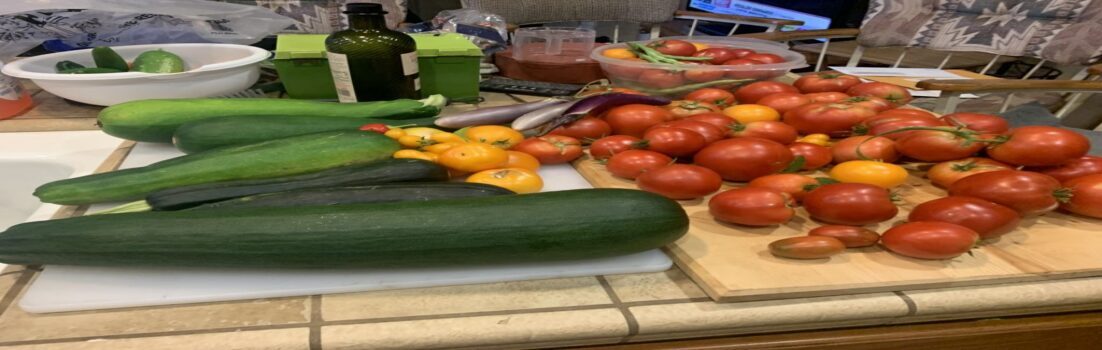
I planted some more hot peppers, basil and some bell peppers. The plants I planted already are producing jalapeno peppers, tomatoes (early bird & yellow pear), egg plants and the cucumber vines are running and cucumbers are sprouting all over the place.
Here is my first small harvest a few weeks ago:
Here is the out of control weeds:
Here is what it looks like after the weed extraction process this past weekend:
Some veggies showing promise:
June 28, 2014
by Darryl Hoytt Comments Off on Late Season Vegetable Garden in Place
My late start on a vegetable garden is finally done. Will probably add some more items here and there plus fine tune the sprinkler drip system as the season moves along but that's to be expected.
This is the final look with a bit of cement cleanup to do:
These are pictures after running the rototiller some more to really turn over the dirt and break it up with that good soil I used the wheelbarrow to get in the last few years. This year the soil was not sticking and I have pretty much diluted that hard packed clay soil that can be common around here in spots.
Oh well break is over time to hit the front yard a bit and then take the items I took out the garden to the dump along with a few other items. Plus I have a bunch of bugs crawling on me from the garden.
June 26, 2014
by Darryl Hoytt Comments Off on A Hump Day Evening after Work Gardening Triumph
I had the perfect storm this evening for getting my weeds chopped down in my garden this evening. First I happened to work from home the end of the day due to a family emergency that turned out ok. Then the skies were overcast and the work I had schedule for later that night for work I was really on top of already! I put on some shorts I didn't mind gardening in that already had some tears, a shirt that was well worn, some old running shoes, a water proof hat that provided shade and protection from vegetation, some gloves that were tough yet flexible and my knee pads that were built for flooring and I was ready!
Here is the disaster I was starting with:
This is the middle stage where I was going to leave things since I didn't think that my rototiller was going to work since I had left gas in there for a long period without using it:
This is what I ended up with by the end of the evening after realizing my rototiller was working ok:
So now I jus have to rake though the rototilled ground to get the remainder of the vegetation and then place my drips hoses back into place and start a late vegetable garden. I already have the plants scoped out at local stores that are already matured for a late start on a garden for this year!
April 14, 2014
by Darryl Hoytt Comments Off on Hammock Rest Gone Wrong
Well after a few hours cleaning up in the yard there is nothing like a nice stay in a hammock with a cold drink by your side unless the hammock feels you are not quite done cleaning up the yard! As you see in the pictures I'm not quite through with the yard, a trip to the dump and some pressure washing the concrete and a bit more lawn maintenance.
Thanks hammock message received I will commence to fixing up the rest of the yard!!
March 13, 2014
by Darryl Hoytt Comments Off on Updated NAS Systems Again
Well added more functionality to both NAS systems. Yesterday I added the second Dell Perc H310 to one NAS system plus added two more 2 TB SAS 6 GB/s drives. Tonight after a very long session working on some clusters at work I finished up my second NAS adding another H310 plus identical drives as the first system.
The only thing I didn't do on the second NAS I did yesterday on the first NAS was to create new storage and another iSCSI target. Yesterday I moved virtual data to the first NAS that I had on the second NAS. Tonight I didn't much feel like creating additional storage groups; I'll do that on another date soon.
I now have the capabilities to talk to all sixteen SAS slots in my chassis. I could have went many routes like another expander, funky cables but adding the second set of SAS controllers was the most efficient and direct solution believe it or not. I would have liked to been able to daisy chain one section of the backplane to the other slots but I didn't see that option. Plus the price was right for the controllers from an EBay dealer so this closes this chapter, for now I can just add storage as needed and start to migrate off of my 3 GB/s drives.
Soon will update to the new FreeNAS point release I think there was some items in the release notes I could benefit from, I'll have to look again. I will also look into the latest updates of XenServer and then its diving back into looking into different CMS/Blog for my sites.