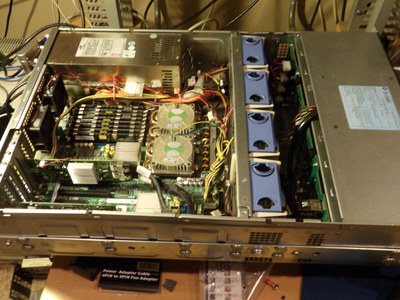
Well in an effort to save space and go up to 6gbs environment totally eventually I rebuilt my physical NAS system. I went from having a:
4U rack mount case that I booted FreeNAS off
an Adaptec 39160 SCSI card,
with a 73gb 10k Seagate ST373207LW SCSI drive
Also in the 4UCase:
a Dell PERC5e connected to
an External SGI 3U Omnistor SE301, 16 Bay JBOD Disk Array
with 3x 2TB 3gbs SAS Drives
with a Dell PERC H310i 6gbs SAS card
2 x 2TB 6gbs SAS hard drives internally (in 4u Case)
Plus 1 x 4tb 6gbs SAS hard drive (in 4u Case)
The motherboard is an Intel S5000PSL
2 x Intel(R) Xeon(R) CPU E5345 @ 2.33GHz
2 x Dynatron H185 Intel Xeon Socket 771
with 20gb FB DIMMS
with HP NC7170 PCI-X Dual Gigabit NIC
In my newly built enviornment I have it booting FreeNAS off of a thumb flash drive with the following:
3U Chenbro RM31616 16-bay Storage server Chassis with 6Gb/s mini SAS
Dell H310 6gbs SAS card
3 x 2TB 3gbs SAS drives
4 x 2tb 6gbs SAS drives
1 x 1 6gbs SAS drives
Intel S5000PSL Motherboard
2 x Intel(R) Xeon(R) CPU E5345 @ 2.33GHz
2 x Dynatron H185 Intel Xeon Socket 771
20GB FB DIMMS
HP NC7170 PCI-X Dual Gigabit NIC
I was able to move the FreeNAS configuration over by saving it to a file on one of my desktop systems and then after it picked up a DHCP address on boot up I uploaded the old configuration and it came up showing my old iSCSI targets to my Virtual environments as well as my NFS shares!
Well this was quite the overhaul! I had to customize and drill some additional holes into some old rails (get new cobalt bit from Home Depot) I have, got some smaller screw heads since this new case was a bit wider, jump over to Fry’s get some cables to take internal fans from 4 pin to 3 pin then get that heavy beast up in the rack and cabled. I also had to take the chassis out to the garage and clean it since i got it used. I also added a couple of 50mm fans at the back of the case in addition to the 4 high volume fans that came with the case
I am happy with the functionality of the new unit and the hot swap capability with the 6gb SAS back-plane I can now make use of a source I have found for some decently priced 6gb\s SAS hard drives. The only complaint I now have is that the noise level has gone up considerably mostly due to the 3 x 400W Power supplies.
All in one night I took my Nagios server from running Fedora 16 to CENTOS 6.5, Updated XenCenter to the latest version 6.2.2 and updated XenServer to 6.2.0 SP1 and solved and issue where my iSCSI target was failing in FreeNAS. I had only planned to get Nagios up and going on the CENTOS server but upon completion of getting the Nagios server configured with the basic systems and monitoring I noticed this nice red X on one of my iSCSI targets in XenServer.
First the Nagios server I had copied my configuration files to my NFS drives prior to blowing away the Fedora 16 OS, so once I had CENTOS 6.5 installed I connected back to the NFS share and made the appropriate changes to my configuration files to point to my new servers. Now that my web server and gaming server plus a few other systems are now in my XenServer virtual environment with different names I just had to go and make the changes in the Nagios configuration files.
I was about to happily grab a book and retire to my bedroom when the iSCSI issue on my XenServer came to my attention. I looked and it said it was missing 2 of my multipathing connections. I checked the connectivity and that was fine as it should have been otherwise several other storage volumes should have shown the same issue.
Well logging into my second FreeNAS node I noticed that it was throwing out some errors and I could not login to do anything. I captured some of the errors with this really catching my eye: “istgt_iscsi.c:5551:worker:***ERROR***pthread_create() failed”. I found a number of people having this issue in the FreeNAS forums with memory issues caused by ZFS volumes. Last time I checked this specific node having the issues was carrying less of a load and not using near as much memory as the other node not giving errors.
I finally decided to shutdown my environment and troubleshoot that FreeNAS node. What I found was that there were some CPU errors with the codes of “8121” (temp trip, a minor error) & “84ff (CPU system log full a major error)”. I went into the bios of the system and cleared the error logs and the system then that FreeNAS node came up just fine. When I placed the loads back on both FreeNAS systems they both are once again working like troopers. I do need to tackle temperature issues in my computer room though.
WhileI was going through the logs of XenServer I had noticed the XenCenter update and the SP1 update and figured since I had created my own little maintenance windows I may as well do the updates now! Updating the XenCenter of course was no issues just run the “.msi” file and it took about 2 minutes. Installing XenServer XS62ESP1took a bit more time but went smoothly as well. The SP seemed to have some support for Windows 8.1 desktop and W2012 Server version plus some drivers so it should be a big plus and I will upgrade the VM XenTools later especially on my W2012 server evaluation server.
I also took the time to switch back to my original master for my XenServer pool cluster.
I also reconfigured one of my router’s that I had already installed DD-WRT on for one of my static Ip’s, what a night!
So tonight rebuilt Nagios server with new Linux version of Centos 6.5, updated my Virtual environment and corrected some issues on my FreeNAS. All I wanted to do was my Nagios server but a productive night with no sleep. I’m going to bed and will unplug the land line to the bedroom!
Well this weekend I made great progress I built a test media server, virtualized a few old physical web servers, as well as my old but powerful XP desktop with 5 SCSI drives I just retired. I have been trying different methods with varied success depending on OS. I am still getting my preferred steps down but I have made progress in all of the various methods.
I have used Clonezilla & Xenserver combination:
Create an image to an NFS share on my NAS using Clonezilla Live CD to boot networked Linux webserver
Boot Clonezilla ISO using XenServer’s NFS ISO library
Restore Clonezilla image from NFS NAS
Boot Rescue Disk and rebuild initrd
Install Xenserver Tools
Used Vmware to Vmconvert Linux Webserver
Boot Rescue Disk and rebuild initrd
Install Vmware Tools
Then export template to desktop
Import template into XenServer
Use XenConvert to clone XP system (not much luck), created VHD disk for C: and quit.
Use Vmware 5.5 Converter to clone XP Desktop system with 5 local SCSI drives kept failing until I deselected last drive.
Crashed VMware ESXi hosts twice. I had upgraded to 5.5 this weekend on that ESXi server. I still need to troubleshoot what happened.
Also tried using Xenconvert on Linux systems using CD but I think with 6.2 it may not be possible.
I think in the future using “DD” and NFS with Xensever may also be an option, maybe even the best option for Linux systems but that’s for a bit later.
This whole exercise just got interrupted as the power on my 20 amp dedicated circuit got overwhelmed and took down my 2 custom built NAS devices running FreeNAS, along with my virtual environments of XenServer& Vmware, and internet radio staion. I will have to remedy that need for another dedicated 20 amp circuits and not wait any longer to take care of that issue! I had to run outside and reset the circuit breaker.
Anyway more details later and maybe I will have time to fully document the procedures along with some other items. I can now comfortably start allocating this hardware to other uses like media servers or pass them along to those who need systems with new desktop OS’ of course.
Looks like I still have a lot of work to do to get UPS and network wiring redone with new equipment along with redoing my websites. Looks like I will totally be moving to Drupal away from Movable Type. Stay tuned!
I was heading off to the bedroom to read a few pages of the latest I’m book reading while I performed a XenServer Storage motion on a couple of my virtual Linux servers after upgrading my NAS memory and storage capacity the last few nights and I could not find the book I was reading. I looked in my favorite eBook readers on my Motorola Atrix checking Moon Reader, Cool Reader, Aldiko and Kindle but none of the books on my continued reading were the fantasy book I had just started by reading a few pages of earlier this week.
Finally I clicked on an ad for an audible reader download while closing one of the eBook readers and looked over to my end table when I realized where my book was. I had been reading an actual physical book that you turn pages on made of paper! I had not read a paperback book in so long I failed to realize that what I was looking for was a book made out of actual tree materials! I found my book and I will be turning actual pages by hand, will not be able to automatically go to where I left off unless I leave a paper book mark, I will not be able to automatically look up the definition of words etc..
I feel this is like going back to nature or a trip to the past reading an actual novel not in electronic format. Looking over at my overstuffed bookshelf I am realizing that only a few years ago I was wondering where I was going to stuff anymore books I bought when I made bi-weekly trips to a used book barn to buy a handful of books at a time. Such nostalgia in a few years time of changed habits and expectations.
How have I done without FreeNAS for so long? This is like that fun gal that can go from the fine dining wine & tea, hang in the hood and then hit the outdoors without skipping a beat !
I built this NAS system earlier this year for my virtual environments mainly so they could be physically High Availability (HA) with shared storage networks that are redundant, multi-paths etc… I just needed one more piece to make it all work together and FreeNAS provides the interface, software know-how all together in a great Open Source package! Really the only thing holding me back has been I need to add another dedicated 20 amp circuit to go along with the one already in my computer room and I might add two more circuits because I like playing with stuff!
With FreeNAS I can share to any OS using all the usual suspects, NFS, iSCSI, CIFS, even Apple’s AFP which I have never used. I mainly use NFS & iSCSI and that let’s me create the storage needed for my XenServer & VMware virtual environment and present storage to my Linux and Windows servers as well as my Linux & Windows desktops.
So why do I say that FreeNAS is like that woman that can handle any environment without skipping a beat? Well FreeNAS has proven it can handle all the issues that come up without the use of a specific 3rd party app or additional handling of external devices one storage system does it all!
Here is what FreeNAS is doing that has me stoked :
Reliable storage making my Virtual environment HA where VM’s move from host to host seamlessly.
Used NFS to share out storage to save CloneZilla images of systems over LAN .
Outgrew my Linux desktop, built another Linux desktop system, shared NFS share to migrate the data in home directory that I needed.
Ran out of space on my Windows desktop, built another Windows desktop and needed to import Outlook mail to Thunderbird email but had no disk space on XP system (yes XP). Created 100gb iSCSI target on FreeNAS, downloaded Windows iSCSI initiator on XP system, format with NTFS, install Thunderbird email on iSCSI drive on windows XP start importing email to Thunderbird during day while I do other tasks. No need to install another hard drive on system or install Outlook again on my Windows 8.1 system.
Creating a media archive with all my music, movies, pictures, personal, financial, legal documents etc..
With Xenserver I can even use FreeNAS for my NFS ISO library so I can easily pick any OS or other ISO to boot off of to troubleshoot or build a VM.
I have one disk array acting as backup with FreeNAS.
Shares music I play on my Internet Radio station
I can keep the storage on specific LAN’s I now have 3 with one strictly storage but I may add another 1 or 2 since some of the iSCSI to my desktops are going over my traditional LAN’s.
FreeNAS adapts capably to whatever scenario I present and seamlessly just like the woman that can fit in anywhere, does it all and enjoys it! Haven’t met the gal like that yet but FreeNAS holds the blueprint!
Well I learned some valuable lessons about upgrading from XCP 1.6 to XenServer 6.2. The lessons were it was important to update to the latest version of XenCenter to match the version of XenServer you intend to update to first if using XenCenter manage systems and pay attention to your status output commands (I know I’ll explain).
For proper background information I updated my XCP1.6 installation with a local CDROM on my physical hosts system. I booted off the ISO DVD I created and it recognized my 1.6 XCP install asked if I wanted to update and followed the prompts from there. I was surprised that the XCP is no longer going to be developed but instead replaced by XenServer going forward since Citrix has now made XenServer fully Open Source.
As I mentioned if you will be interacting with XenCenter at all to talk to your host servers upgrade to the XenCenter version that corresponds to your latest XenServer release which is in this case of course 6.2 I made some changes on my slave host, the first system I updated in my 2 node cluster that I should not have due to the older version of XenCenter not to being able to properly render certain properties of my newly updated XenServer and giving incorrect information.
The way I found out about the XenCenter compatibility issue was when I tried to place my slave hosts system back into the shared pool after removing the slave to correct network interfaces that had disappeared. XenCenter told me it could not place my slave back into the pool with the master since they were different versions. This is when I updated XenCenter and then the master. The master server in the pool updated without any of the issues I had with the slave.
You can get the new XenCenter version by pointing to the newly upgraded XenServer host in a browser window:
The next issue I had to deal with was reconfiguring the network information I had lost when trying to get the slave recognized in the older version of XenCenter while in the pool with the master who was still @ XCP 6.1 at this time. I placed the proper NIC configurations on the network cards and then placed the slave back in the pools with the master.
Now I still could not get the slave to recognize my shared iSCSI storage once back in the pool while the master had no issues seeing the storage. Well to make a long discovery into a shorter story I had to destroy the previous shared pool plugin that existed previously on my system. I really thought that I had done that and tried to get the shared iSCSI storage plugged in several times. But there was a second plugin I had ignored but was pointing to the same shared storage that was causing me issues.
What I failed to realize was that while I had added the slave back into the pool with the same alphanumeric name I did not say “use the existing XenCenter name” therefore it added the slave XenServer host in with the same name but XenCenter and somehow the XenServer hosts still had the old information and treated it as a separate name. I actually had to delete the old name from the shared pool. There was also a leftover “Xen storage plugin configuration” I kept overlooking though it showed in the output I had ignored it since I knew it should have only one “Xen Storage Plugin configuration” I dealt with the most recent one.
To explain better in a more truncated way this is what I ended up doing to get the slave to see the iSCSI shared storage again on my newly upgraded XenServer 6.2 environment after I had corrupted the network configuration and storage repository:
–List shared iSCSI storage
o# xe sr-list type=lvmoiscsi
–Show the plugins if any associated with this iSCSI storage (this command showed output of two plugins one which I ignored and cause issues):
o# xe pbd-list sr-uuid=<SR UUID>
–Next unplug shared storage:
oxe pbd-unplug uuid=<PBD UUID>
–Next destroy plugin
o# xe pbd-destroy uuid=<PBD UUID>
o# xe pbd-destroy uuid=<PBD UUID>
–Then from XenCenter GUI I “detached” the shared storage and “forgot” the storage and then reattached and everything worked out just fine with both servers in the pool.
That is the story and its quite long but the actual work was much longer! The story to summarize when updating to a newer version fist work with the newer version tools since they are backwards compatible in most cases. Also never neglect your output it’s there for a reason!
I wanted to have some sort of failover for my XCP 1.6 virtual environment prior to going to that full time with backups and restore procedures in place plus some failover capability using HA-Lizard. I got a great indication I’m heading in the correct direction when a couple of hours ago I started shutting down the VM’s on my XCP system and they kept restarting.
A big duh I had implemented HA-Lizard Saturday evening verified settings and was enabled on my shared pool on XCP and all VM’s residing on those servers within those pools. So as I shutdown each VM gracefully from the OS I noticed that each time it restarted.
I went on the CLI of my Master XCP server in the pool and did the following to finally shutdown first the HA-Lizard environment and then the XCP environment until later when I make more additions and have time to work on it:
Go to the XCP Master Server Console
#service ha-lizard status –>> verified HA-Lizard running
#service ha-lizard stop –>> Stopped HA-Lizard service but HA-Lizard watchdog service restarted HA-Lizard service
#service ha-lizard status –>> verified HA-Lizard HA service running after started by HA-Lizard watchdog service
#service ha-lizard -w stop –>> Stops HA-Lizard watchdog service and HA-Lizard HA service
#service ha-lizard -w status –>> Verify HA-Lizard watchdog service stopped
#service ha-lizard status –>> Verify HA-Lizard HA service stopped
Shutdown each VM from OS and they now stayed shutdown.
Placed XCP servers in maintenance mode and then shut them down.
I also noticed that before I shutdown the HA-Lizard services if I went to place the XCP host master server or slave server in maintenance mode I was notified it would migrate my VM guest OS’! How sweet is that!
This HA-Lizard XCP combination may be just what I have been looking for a truly Open Source virtual HA environment !
Well I just wanted to install Fedora 19 and didn’t want to move hardware around right now plus I need to move some web/game server functions to virtual systems again anyway so I built an Fedora 19 guest system on one of my XCP 1.6 nodes to play with for a bit.
They didn’t change much on the Anaconda Fedora install, you can still only select one group of packages i.e “Web”, “Infrastructure”, “Gnome Desktop”, Cinnamon Desktop”, “KDE Desktop”, etc.. Someone sincerely believes that limiting us to the selections they feel are necessary to your environment for a simple UI (User Interface) install is a ok. So now you have to take the time to build a kickstart or manually install the packages you wanted after initial install. Not very time efficient when you just want to do a quick UI install as opposed to installing a group of systems using kickstart.
They also kept the the partitioning User Interface clumsy and illogical, at least to me it is. I like the way the let you select the disk or LUN’s to use but when you go to partition its a mess. Looks like they want you to declare your mount points before you have even created the volume groups and decided which disks will belong to what volume groups!
Once in the partition screen you can use the drop down to create an LVM volume group but you have to already have to have a mount point selected and in my case that mount point belonged to another disk and volume group. I was able to get it to work but you have to temporarily assign the highlighted mount point to the new volume group, create your new mount point making it about 1mb and then switch the mount points around later and adjust the sizes. Then you have to make sure you double-check to insure when you highlight the mount point it shows the proper size and volume group designation! Then the interface kept dying on me so I decided to add the extra disks and volume groups manually after the initial install along with the extra software packages I want.
After everything is selected you hit click install and then it asks you for a “root” password and to create a regular system user and that password while you watch it start the process of installing packages below. That is way to bizarre and backwards. This should come before you hit install.
I love change and there has to be change. We are conditioned that way as humans to survive because if we didn’t change and adapt in a world that hurtles around the sun and has winds, water and other elements that change the environment we do not survive.. Digressing here but in the Linux world for some reason we have lost something, its almost as if the people developing this are former MS Windows people bent on taking away options and hiding things. I understand the need for more acceptance to keep this going but taking away options and ASSuming everyone wants to dumb down options is the wrong way to go.
Anyway got it installed had to do a bunch of manual stuff no problem just extra time plus it was able to pickup my proper timezone here in Fedora 19 as opposed to Fedora 18 so some progress. Plus after all of these years of using Linux since the early/mid ’90’s I still love it and its my OS of choice but my old friend BSD is a peeking around the corner!
Well I overloaded the circuit with te number of systems I had on it and didn’t have my UPS on so it took down my site and support systems. I had some of my new systems I had built plus new disk arrays and the power went off.
Well I moved my desktops systems off of the server circuit and will make a few more adjustments like that plus hopefully hook back up my UPS that blew its voltage regulator. I should have went with a 40 amp circuit instead of a 20 amp but of course had less powerful systems then. I also will not have this many systes once my new setup is completed the old systems will be shutdown!